Notes
Your space for ideas, thoughts, and everything that doesn't fit in a task.
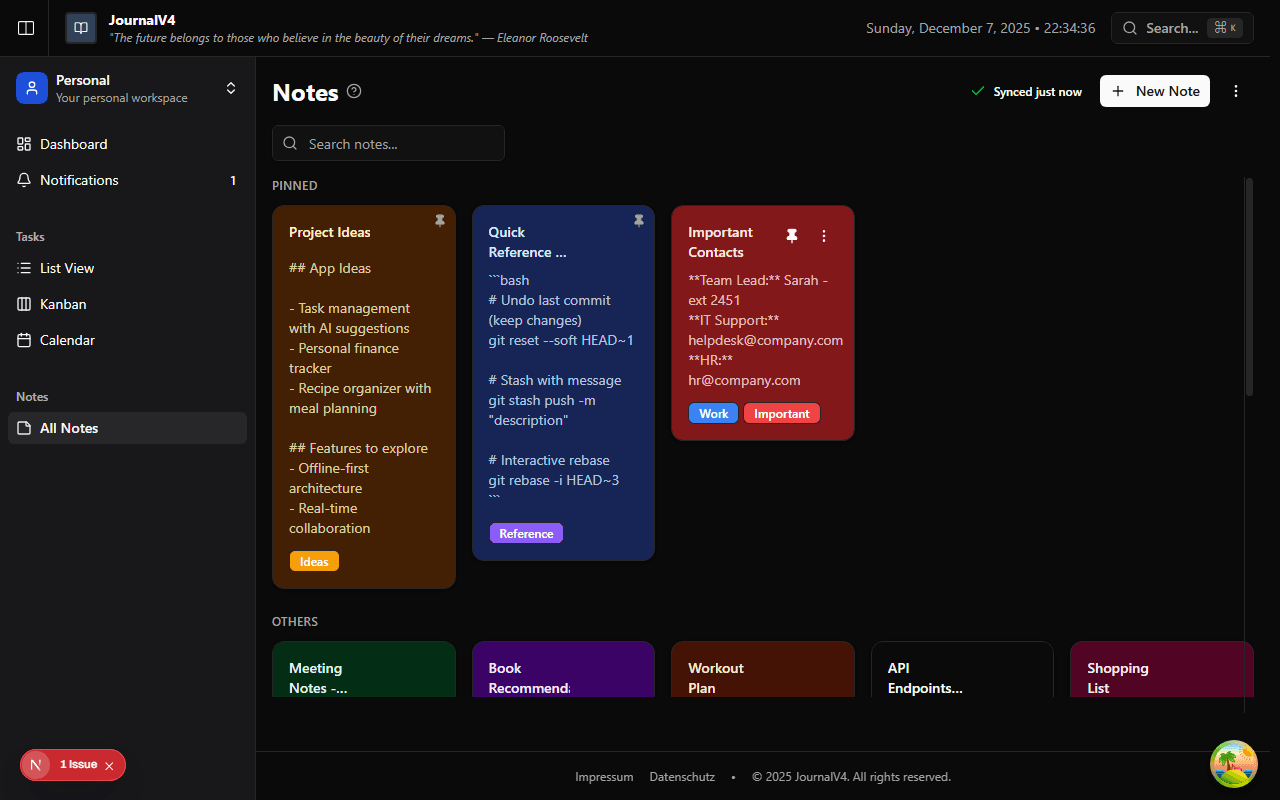
Capturing Ideas Quickly
Sometimes you just need to write something down right now. Notes are perfect for that. Click New Note, start typing, and it saves automatically as you go.
No format restrictions, no templates. Just a title, your content, and you're done. Come back and add more later if you need to.
Color-Coding That Actually Helps
Give each note a color and suddenly your grid becomes scannable. At a glance, you know exactly where to look:
Pick a color when creating or editing a note. Use whatever system makes sense to you—there are no rules.
Labels for Finding Things Fast
Colors are visual. Labels are searchable. Use both for maximum organization power.

Create labels that match how you think: "Project Alpha," "Blog Ideas," "Recipes." Apply as many as you need to each note.
Later, filter by label to see only what you need. No more scrolling through everything to find that one note.
Pinning What Matters Most
Working on something important? Pin it. Pinned notes stick to the top of your grid, so they're always the first thing you see.
Great for things like your weekly goals, an active project brief, or that one note you keep coming back to.
Archiving Without Deleting
Done with a note but don't want to lose it? Archive it. It disappears from your main view but stays searchable. You can always bring it back.
Perfect for notes from completed projects, old meeting notes, or anything you might need to reference later.
Making the Most of Notes
- One note, one topic — Resist the urge to cram everything into one giant note. Small, focused notes are easier to find.
- Use descriptive titles — "Meeting Notes 12/5" is less helpful than "Q4 Planning Meeting with Marketing."
- Review and archive regularly — Keep your active notes relevant. Archive what you don't need daily.
- Link notes to tasks — Working on something related? Add a note link to your task so context stays connected.